Toolkits
Xmt: Motif Tools
David Flanagan’s Motif Tools library: its origins, approach to interface construction, and resources for programmers.
Xmt, the Motif Tools library, adds widgets and programming utilities to
Motif applications. It builds on Motif (libXm) and the X Toolkit
Intrinsics (libXt), helping application programmers assemble interfaces
with less repetitive code. The project distributes a C library together with
utilities, documentation, tutorials and examples.
Source: Xmt project
If these layers are unfamiliar, start with the X programming stack
and our small Motif application. Xmt is an additional
dependency for applications that use its facilities; ordinary Motif programs
can use libXm and libXt directly.
Xmt in a running application
Xmt extends Motif, so an Xmt application can retain the same Motif controls. Here the Xmt Layout widget arranges a heading, a framed status label and a row of buttons. The labels and buttons themselves are standard Motif widgets.
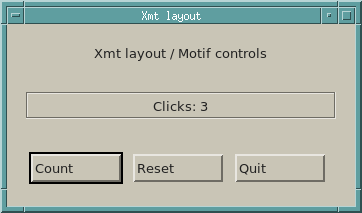
Download xmt-counter.c. The complete example keeps its fallback resources in the C file, so no separate application-defaults file is needed. Its layout resource is:
*panel.layout: Col { heading # Etched status # buttons }Col arranges the named children vertically, # adds spacing, and Etched
frames the status label. The program calls XmtRegisterLayoutParser() before
creating the Layout widget. An explicit *panel.font: fixed resource supplies
the core font that Xmt 4.0.0 uses for layout measurements. The three buttons count activations, reset the
label, and quit.
With the Xmt, Motif, Xt and Xlib development files installed in the compiler’s usual search paths:
cc -std=c99 -Wall -Wextra -o xmt-counter xmt-counter.c -lXmt -lXm -lXt -lX11 -lm
./xmt-counter
For an uninstalled Xmt build and a local Motif checkout, adjust these paths:
XMT_BUILD=/path/to/xmt400
MOTIF_BUILD=/path/to/motif
cc -std=c99 -Wall -Wextra \
  -I"$XMT_BUILD" -I"$MOTIF_BUILD/lib" \
  -o xmt-counter xmt-counter.c \
  -L"$XMT_BUILD/Xmt" -L"$MOTIF_BUILD/lib/Xm/.libs" \
  -Wl,-rpath,"$XMT_BUILD/Xmt" \
  -Wl,-rpath,"$MOTIF_BUILD/lib/Xm/.libs" \
  -lXmt -lXm -lXt -lX11 -lm
./xmt-counter
This example was checked with Xmt 4.0.0’s static library and the local Motif
shared library on Linux. Build Xmt against the same Motif headers used for the
application. The layout grammar and parser are documented in the XmtLayout
and XmtRegisterLayoutParser manual pages included in the
Xmt 4.0.0 source distribution.
Compare the plain Motif version: its container
is XmRowColumn, while this version delegates the outer arrangement and status
frame to Xmt.
Why Xmt was created
David Flanagan wrote the original library and its accompanying book out of frustration with the difficulty of programming Motif and Xt. The project’s historical author page describes that motivation and his later move to a less active role in Xmt development. Source: the author of Xmt
Xmt’s approach emphasises separating the interface description from application logic. Its project introduction presents resource-based programming, additional widgets and easier layout as ways to move from a prototype to a working application. This makes Xmt interesting both as a practical library and as an example of how Motif developers tried to simplify interface construction. Source: Xmt introduction
What it adds
| Area | What Xmt offers |
|---|---|
| Interface construction | Facilities for describing and creating widget hierarchies through resources. |
| Layout | A Layout widget for arranging controls without hand-building every relationship with Motif Form attachments. |
| Menus | A Menu widget that builds menus from descriptions in resources or C code. |
| Application utilities | Convenience routines for tasks such as handling Motif strings and transferring values between dialog fields and application data. |
These are features of the library described with Flanagan’s book; exact APIs and available widgets should be checked against the Xmt release being used. The contemporary Motif FAQ preserves the book’s feature description and identifies the original library’s nine custom widgets and more than 250 convenience routines.
The book
David Flanagan, Motif Tools: Streamlined GUI Design and Programming with the Xmt Library was published by O’Reilly & Associates in August 1994, first edition, ISBN 1-56592-044-9. The printed book included a CD-ROM. It is a guide to the library and application development, complementing the general Motif manuals in the numbered X Window System series. Bibliographic source
The illustrated book catalogue includes its cover and publication details alongside the other Motif books. When studying a later Xmt release, read its documentation alongside the book: the 1994 text describes the library as it existed at that time.
Source and documentation
The historical project site identifies version 3.0.0 as the point at which Xmt became freely available as open source. SourceForge lists the project under the BSD licence category. These describe the later project; older distributions and vendor bundles may carry different accompanying terms. Project introduction, project listing
- Xmt project website: background, author information and the original project navigation.
- Release files: source distributions; begin with the README, build instructions and examples supplied with the particular release.
- Source repository: project source browsing and repository information.
- Project discussions: historical development and usage discussions.
Continue with the Xt overview for the underlying widget framework, or return to the programming guide.