Learn
Your first Motif application
Build a small C program, connect callbacks, and understand its widget tree.
This program displays two buttons. One counts activations; the other quits. It demonstrates a widget hierarchy, resources, callbacks and the event loop in one C file.
Before you begin
You need a C compiler, the development headers and libraries for Motif, Xt and Xlib, and access to an X server. Development-package names vary by operating system.
Run the program from a terminal in your graphical session. The DISPLAY
environment variable selects the server; the application must also have
permission to connect. See the X stack overview for the roles of
these components.
The complete program
Save this as hello-motif.c, or download the source.
#include <stdio.h>
#include <X11/Intrinsic.h>
#include <Xm/Xm.h>
#include <Xm/PushB.h>
#include <Xm/RowColumn.h>
#include <Xm/Protocols.h>

static void
count_click(Widget widget, XtPointer client_data, XtPointer call_data)
{
    unsigned int *count = (unsigned int *)client_data;
    char text[64];
    XmString label;

    (void)call_data;

    ++*count;

    snprintf(text, sizeof text, "Clicks: %u", *count);

    label = XmStringCreateLocalized(text);
    XtVaSetValues(widget, XmNlabelString, label, NULL);
    XmStringFree(label);
}

static void
quit(Widget widget, XtPointer client_data, XtPointer call_data)
{
    (void)client_data;
    (void)call_data;

    XtAppSetExitFlag(XtWidgetToApplicationContext(widget));
}

int
main(int argc, char **argv)
{
    XtAppContext app;
    Widget shell, row, count_button, quit_button;
    Display *display;
    Atom wm_delete;
    XmString label;
    unsigned int count = 0;
    String fallback[] = {
        "*title: Hello Motif",
        "*row.marginWidth: 12",
        "*row.marginHeight: 12",
        "*row.spacing: 8",
        NULL
    };

    XtSetLanguageProc(NULL, NULL, NULL);
    shell = XtVaAppInitialize(&app, "HelloMotif", NULL, 0,
                              &argc, argv, fallback, NULL);
    row = XtVaCreateManagedWidget("row", xmRowColumnWidgetClass,
                                  shell, NULL);

    label = XmStringCreateLocalized("Clicks: 0");
    count_button = XtVaCreateManagedWidget(
        "count", xmPushButtonWidgetClass, row,
        XmNlabelString, label, NULL);
    XmStringFree(label);
    XtAddCallback(count_button, XmNactivateCallback, count_click, &count);

    label = XmStringCreateLocalized("Quit");
    quit_button = XtVaCreateManagedWidget(
        "quit", xmPushButtonWidgetClass, row,
        XmNlabelString, label, NULL);
    XmStringFree(label);
    XtAddCallback(quit_button, XmNactivateCallback, quit, NULL);

    display = XtDisplay(shell);
    wm_delete = XInternAtom(display, "WM_DELETE_WINDOW", False);
    XtVaSetValues(shell, XmNdeleteResponse, XmDO_NOTHING, NULL);
    XmAddWMProtocolCallback(shell, wm_delete, quit, NULL);

    XtRealizeWidget(shell);
    XtAppMainLoop(app);
    XtDestroyWidget(shell);
    XtCloseDisplay(display);
    XtDestroyApplicationContext(app);
    return 0;
}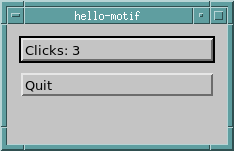
-geometry 220x120 to give the two buttons a little room.Compile and run
With the development files installed in the compiler's usual search paths:
cc -std=c99 -Wall -Wextra -o hello-motif hello-motif.c -lXm -lXt -lX11
./hello-motif
What the program does
XtSetLanguageProcestablishes locale handling before toolkit initialisation.XtVaAppInitializecreates the application context and top-level shell.- An
XmRowColumncontains twoXmPushButtonchildren. The container arranges them, so the example does not assign pixel coordinates. XtAddCallbackconnects each button's activation to application code.XtRealizeWidgetcreates the required X windows;XtAppMainLoopdispatches events until the exit flag is set.
The window-manager close request uses the same quit callback. After the loop returns, the program destroys its widget tree and closes the display connection.
Strings, callbacks and lifetime
XmNlabelString takes an XmString, rather than a plain C string. This example
creates a compound string, assigns it to a button and frees the temporary. The
label resource keeps its own copy. Do not generalise that ownership rule to
unrelated resources or pointers returned by getters; check the individual API.
The Motif source distribution includes the XmStringCreateLocalized,
XmStringFree and XmLabel manual pages.
Source: Motif source releases
The counter lives in main, which remains active throughout the event loop.
Its address is passed as callback data. Returning from a helper function while
leaving a callback pointing at that function's local variable would be unsafe.
An activation callback also avoids tying the application to a particular mouse event: keyboard activation can follow the widget's normal input behaviour.
Try changing it
- Change the initial labels and the fallback spacing resources.
- Activate the counter with the keyboard as well as the mouse.
- Resize the window and observe the container's layout.
- Add a reset button that changes the counter and updates the displayed label.
Continue with the programming resources for tutorials and reference manuals, or Xt's design for more background.
Next, explore the widget gallery and learn how X resources configure an application.