Learn
Understanding the X programming stack
How X11, Xlib, Xt, Athena, Motif and the window manager fit together.
X11, Xlib, Xt, Athena and Motif name different parts of a graphical application system. Knowing which part owns a problem makes both learning and debugging easier.
From an application to the display
Athena and Motif provide different widget sets on the same Xt foundation. Xmt adds further facilities to Motif. Their relationships look like this:
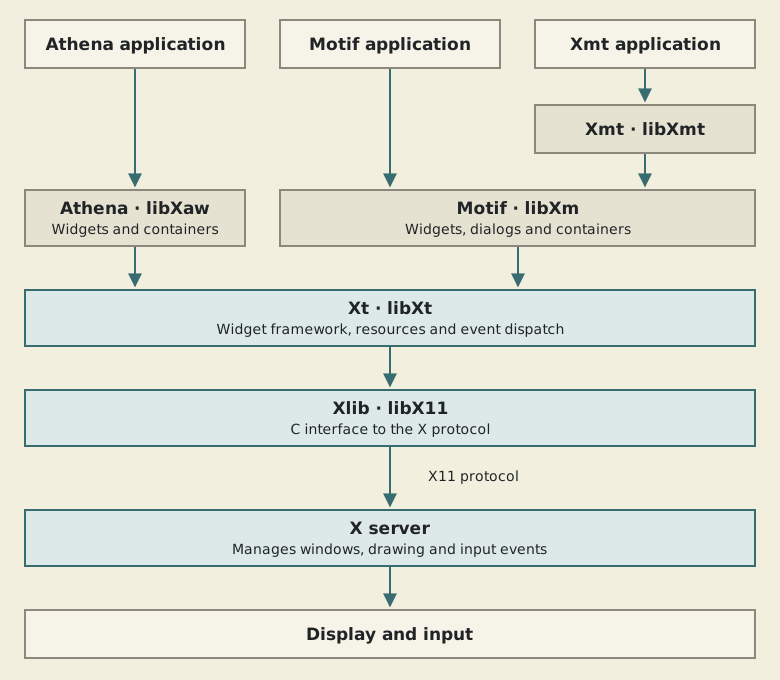
This is a conceptual view: application code and widgets can call lower-level interfaces directly. It does not mean every operation passes through every box.
X11 is the protocol used by clients and the X server. The application is a client even when it runs on the same machine as the server. Xlib provides a C interface to that protocol. Calls can be buffered, and an error may be reported later than the call that caused it. X.Org's Xlib and XCB guide explains this behaviour and the alternative XCB interface.
Xt supplies the toolkit framework. Athena and Motif supply controls built with that framework; neither widget set is a prerequisite for the other. For a concrete comparison, see where Athena fits into Xt and the accompanying counter examples. Xmt extends the Motif side with additional widgets and utilities.
Where the window manager fits
The window manager is another X client. It manages top-level windows: their placement, decorations and interactions with the surrounding desktop. The application manages the controls inside its own interface.
That distinction matters when customising an application. Changing a button's Motif resources does not necessarily change its titlebar. Conversely, choosing a different window manager does not replace the application's widget library. The X.Org documentation directory links to the protocol and client documentation for these separate roles.
Vocabulary you will encounter
| Term | Meaning in this context |
|---|---|
| Display | A connection to an X server, commonly selected through DISPLAY. |
| Window | An X object used for drawing and receiving events; not necessarily a whole application window. |
| Widget | An object in the toolkit hierarchy, such as a button or container. |
| Gadget | A Motif control that shares a parent's X window instead of having its own. |
| Shell | A toolkit widget used at the boundary between an application and window management. |
| Resource | A named setting, such as a label, colour or layout constraint. |
| Callback | An application function invoked for a higher-level toolkit notification. |
The Motif Programming Manual introduces this vocabulary in its programming-model chapters.
Where should I start?
To make a working interface, begin with the small Motif example. To understand drawing and events at a lower level, follow the Xlib tutorials in the programming guide. You do not need to master all of Xlib before creating a button, but the lower layers become useful when debugging or adding custom drawing.