Toolkits
Xt: history and design
How the X Toolkit Intrinsics support Athena and Motif, and where the framework came from.
Xt is the X Toolkit Intrinsics: the framework underneath Motif's widgets.
Its library is called libXt. If Xlib provides access to the X server, Xt
provides machinery for organising an application around widgets.
Start with the X programming stack if these terms are unfamiliar.
Athena Library
Athena is a widget set built on Xt. Its library, libXaw, supplies
ready-made controls such as: Command buttons, Labels, text editors and menus,
plus containers such as Box, Form and Paned. Xt supplies the common machinery
those widgets use: class inheritance, resource handling, callbacks, event
dispatch and geometry negotiation.
The Athena manual describes Xaw as a sample implementation of a widget set.
It is also usable for real applications. Keeping it separate from the Intrinsics
allows other widget sets to use the same framework with different appearance
and behaviour. Motif (libXm) occupies that same layer: it builds on Xt
without requiring Athena.
Source: Athena Widgets and the Intrinsics
| Library | What it contributes | Examples in our counter programs |
|---|---|---|
Xlib (libX11) | Communication with the X server and window-level operations. | Interning the WM_DELETE_WINDOW atom. |
Xt (libXt) | Widget infrastructure and application event handling. | XtVaAppInitialize, XtAddCallback, XtAppMainLoop. |
Athena (libXaw) | One set of controls and layout containers built on Xt. | commandWidgetClass, labelWidgetClass, boxWidgetClass. |
Motif (libXm) | Another widget set, with its own controls, resources and interaction conventions. | xmPushButtonWidgetClass, xmLabelWidgetClass, xmRowColumnWidgetClass. |
Xt does provide foundational classes, including Core, Composite and Shell. These establish how widgets work and connect to window management; a widget set supplies the application controls built on that foundation. Its container classes decide how to arrange children, using Xt's geometry-management protocol. Source: Intrinsics specification
Following a button activation
In the Athena counter below, Xt dispatches
input to the Command widget, whose behaviour leads to our callback. The callback
changes the Label's text through XtVaSetValues; Athena's Label implementation
draws that text. The application owns the counter value throughout.
Compare the same operations in the Motif counter:
| Operation | Athena example | Motif example |
|---|---|---|
| Create the button | commandWidgetClass | xmPushButtonWidgetClass |
| Register its callback | XtAddCallback(..., XtNcallback, ...) | XtAddCallback(..., XmNactivateCallback, ...) |
| Set the label | XtNlabel with a C string | XmNlabelString with an XmString |
| Run the event loop | XtAppMainLoop(app) | XtAppMainLoop(app) |
Xt can support widgets from different sets in one application, but widget sets may rely on private conventions that limit interoperability. Sharing Xt does not guarantee that every combination behaves correctly. Source: Athena manual
Xmt has a different relationship: it adds facilities on top of Motif and Xt. Its counter uses an Xmt Layout container with Motif labels and buttons.
What an Xt application looks like
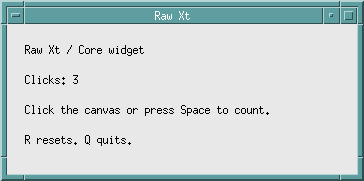
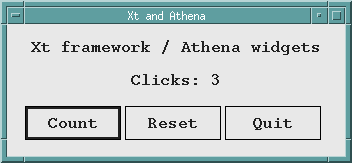
These two examples implement a counter at different levels. The first links
only to Xt and Xlib; the second adds Athena widgets. Both screenshots show the
program after three clicks, with window decorations supplied by mwm.
Raw Xt: a Core widget
Xt supplies a basic Core widget, which gives this example a window and resources such as its size and background. Our code supplies the drawing and interaction. There are no Label or Command widgets in this version.
Download xt-counter.c. With Xt and Xlib development files installed:
cc -std=c99 -Wall -Wextra -o xt-counter xt-counter.c -lXt -lX11
./xt-counter
Click anywhere in the canvas, or press Space, to increment the counter. Press R to reset or Q to quit. The window manager’s close control works too. The key bindings apply while the application has keyboard focus.
The program creates coreWidgetClass beneath its application shell and uses
XtAppAddActions with a translation table to connect input to its own actions.
An expose-event handler repaints the canvas with XDrawString; the actions
also repaint it when the value changes. Xt still supplies widget creation,
resource handling and the event loop.
This is deliberately a small drawing example. Text placement, repainting and input behaviour belong to the application here. A widget set packages those responsibilities into reusable controls, as the Athena version demonstrates.
Athena widgets
Xt supplies the framework; the widget set determines the controls’ appearance.
This example uses Athena (libXaw), one of the classic widget sets built on
Xt. Its flat buttons contrast with the bevelled controls in the
Motif example.
Download athena-counter.c. With the Xaw, Xt and Xlib development files installed:
cc -std=c99 -Wall -Wextra -o athena-counter athena-counter.c -lXaw -lXt -lX11
./athena-counter
Count updates a Label through a Command widget’s callback; Reset clears the total and Quit exits the event loop. A Box widget arranges the controls. The source also handles the window manager’s close request.
Origins and contributors
Xt grew out of work at Digital Equipment Corporation and MIT's Project Athena. The Intrinsics specification credits Joel McCormack with the principal design of the X11 Intrinsics, and Charles Haynes, Mike Chow and Paul Asente with major design and implementation contributions. Ralph Swick contributed to the framework and its specification. Its acknowledgements also identify the earlier X10 toolkit team and the wider group that reviewed and developed Xt.
The transition from X10 to X11 involved a redesign, informed by experience with the earlier toolkit. Later revisions were collaborative X Consortium work; Xt's history is larger than any one author or company. The specification's acknowledgements and evolution chapter are the best starting points for following those contributions. Source: X Toolkit Intrinsics specification
Why a framework?
Consider a program with a button, a text field and a resizable work area. It needs rules for constructing those objects, assigning settings, routing input and negotiating their sizes. Repeating that infrastructure in every application would make it difficult to share widgets.
Xt supplies the common framework. A widget set supplies the controls and their behaviour. Athena and Motif are two different widget sets built on Xt; an application using Xt does not thereby become a Motif application. The Athena widget manual is a useful comparison when exploring this separation.
Reading an Xt application
These are useful questions to ask when approaching unfamiliar source:
| Question | What to look for |
|---|---|
| Where does the application start? | Application-context and shell creation. |
| What does it construct? | Widget classes, instance names and parent-child relationships. |
| Where are its settings? | Resource arguments, fallback resources and application-defaults files. |
| What happens after an action? | Callback registration and callback functions. |
| How are controls arranged? | Container widgets and geometry resources. |
| What keeps it responsive? | The event loop, timers and registered input sources. |
Our first Motif program follows that sequence in a single file. Reading it alongside a larger application makes it easier to separate the application's own logic from the toolkit machinery.
Learning more
Use a tutorial to learn the vocabulary, then the specification to settle precise questions. In particular, creating, managing and realising a widget are different operations; a callback is not the same thing as a raw event handler.
The programming guide collects introductory material and references. The companion Motif history describes the widget toolkit that builds on this framework.